Smart shopping in your kitchen – the Waitrose Hiku
I’ve made it out of the house – I’ve got my wallet, shopping bags, and three kids all safely strapped into their respective car seats without too much screeching, moaning and wailing. I’ve found a trolley with two kids seats, I’ve got them OUT of the respective car seats and all safely herded into the aisles full of offers and treats…
…and OH NO. I FORGOT THE SHOPPING LIST!
I’ve managed to get some time to sit in front of the computer, without one of the kids sitting ON the computer, or standing next to me doing the universal whinge, or having a go at completing their latest ‘front room destruction in under a minute challenge’…
…and my brain shuts down. My mind is BLANK.
How often has that happened? It happens all the time for me. Random items get bought, in a kind of pre-apocalypse panic: ‘I don’t know what I want but I know I wanted something, lets just order some STUFF and hope that some of the stuff is the stuff we actually need…’
Is there a way to avoid all that? Can you actually prepare a list, remember the list, and buy the things on the list without something going wrong in the middle?
Waitrose think you can. And that’s because they’ve invented Hiku – a clever little gadget with a magnet that sticks to your fridge (or in our case, our hob hood) and scans or records everything that you want to put on your list, adding them to your Waitrose shopping basket so that when you log in you just need to make a few edits and you’re ready to check out. Or so the theory goes, anyway.
And in practice? Well, here is how we found it:
1. Setup
The Hiku arrived – sleek, shiny and small – and ready charged (it uses mini USB). Also, complete with full instructions. We had to download an app on to our iPad and then stand the Hiku on top of it, while it did a lot of flashing. That was to register our particular Hiku to the app.
I don’t know how it works, but after three attempts it DID work, and we were one step further towards stress free shopping.
Then we had to link the app to our Waitrose account. That went smoothly…and we were ready to go!
2. Scanning and speaking
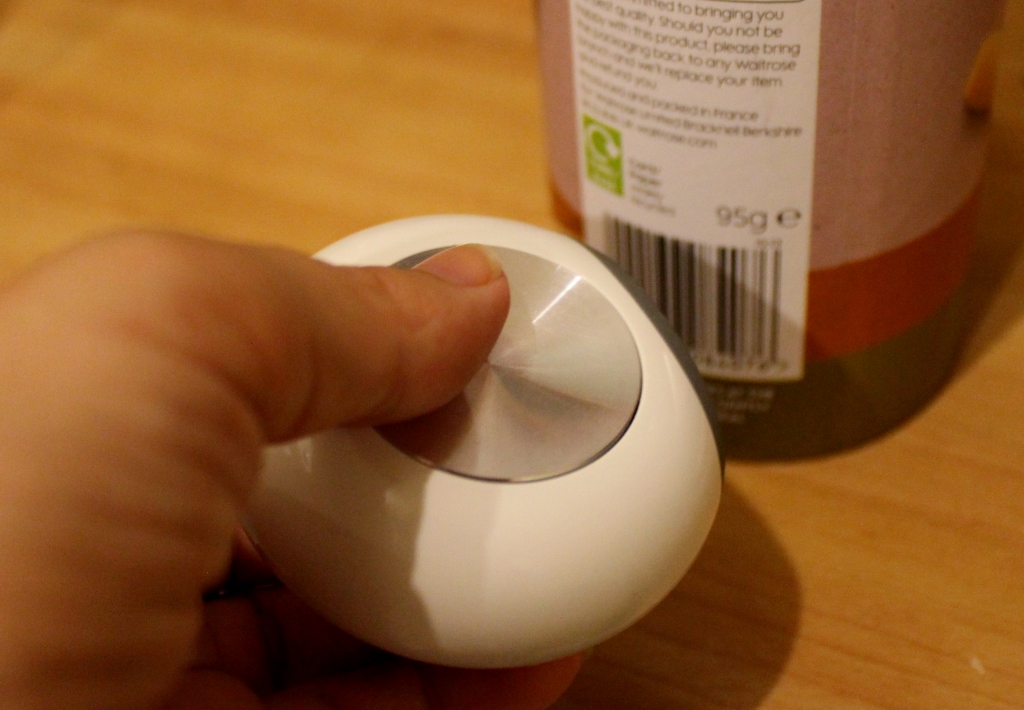
There are two ways to get Hiku to add things to your list. One way is to scan their barcodes as and when you run out of something (and they don’t have to be Waitrose products – for instance, I scanned a tub of mini breadsticks from another supermarket and it knew what they were and added ‘breadsticks’ to the list. Branded items scanned with no problem either). But of course there were some supermarket own brand items from others and some branded items that aren’t stocked by Waitrose that didn’t scan…and that’s where the second method comes in: you can talk to the Hiku.
So we pressed the button, and said ‘anchovies’.
PING! Anchovies appeared on the list!
Logging into the list a bit later, it was obvious that the kids had seen what I did, and they added their own demands*:
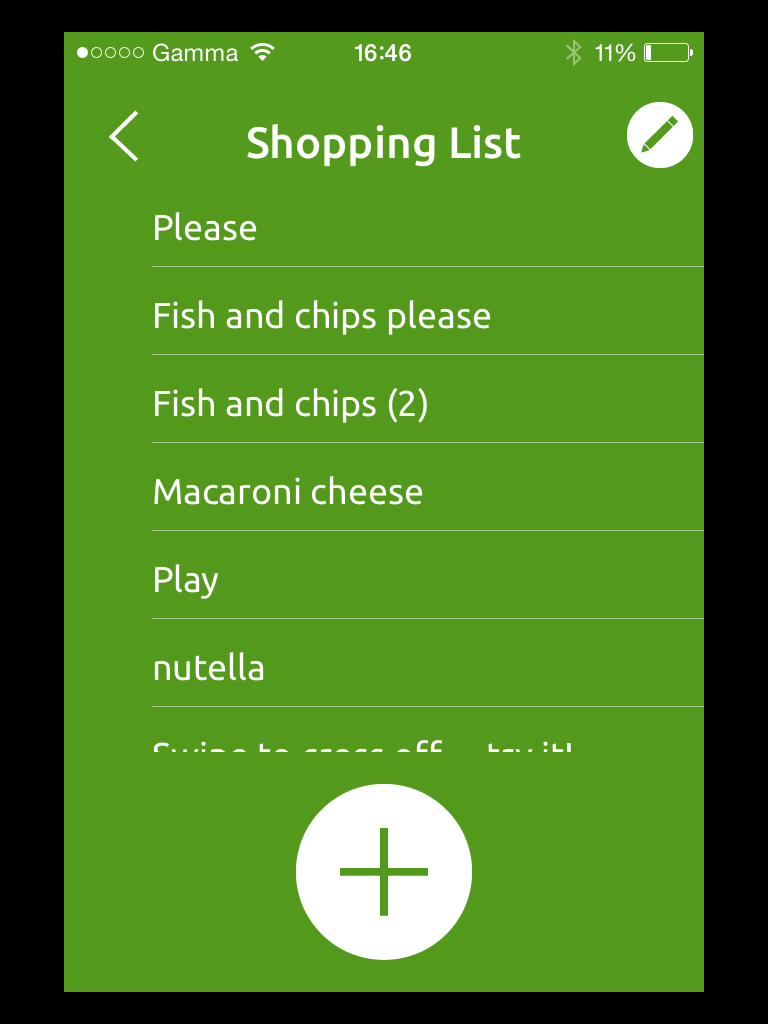
And then the Other Half had a go. This highlighted one issue with the Hiku – it is pretty keen on people having a clear, Queens English pronunciation. The Other Half, being a Kiwi, doesn’t always speak in that way and so when he asked for ‘spaghetti’ and ‘chorizo sausage’ this is what Hiku THOUGHT he said:
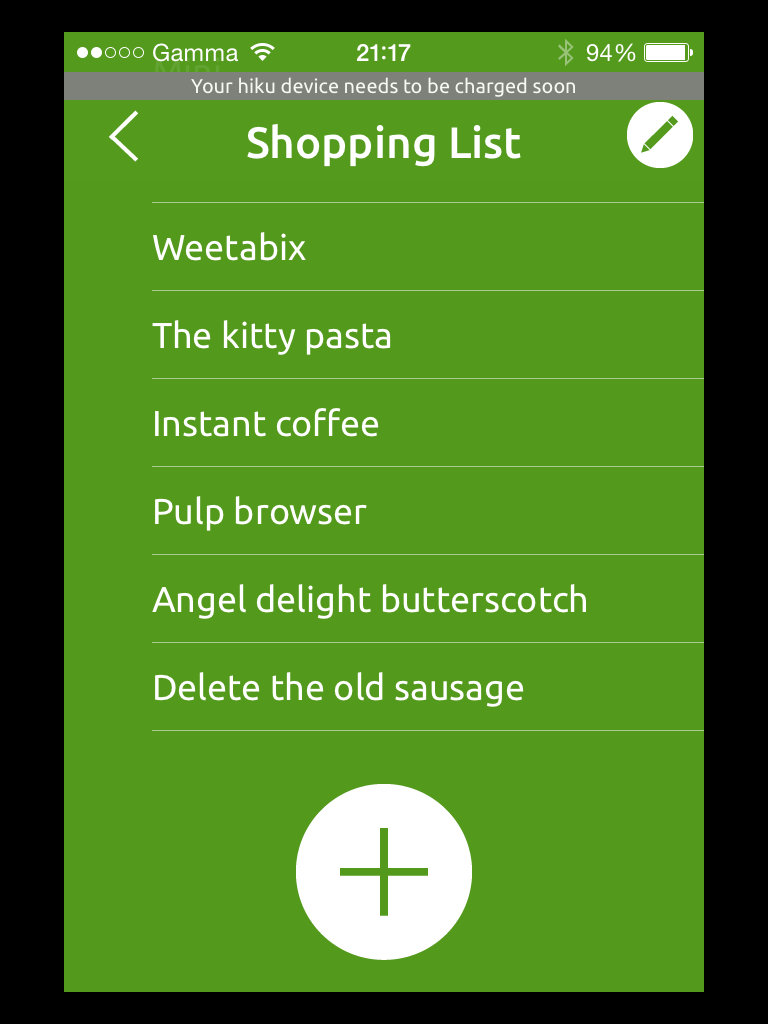 (in case you are wondering, that would be ‘the kitty pasta’ and ‘delete the old sausage’. I’m not even sure what ‘pulp browser’ is meant to be, the Other Half seems to think he said ‘soft brown sugar…’).
It might not have been what we wanted but oh, it did make us laugh. And after that he made a bit more of an effort to speak clearly and we had no more requests for random kitties or deleting things. Less amusing, but far better for our growling tummies
3. Ordering
It took me a little bit of time to figure out where to actually get the list from once I was logged into my account on the computer, and import it into my basket. It’s not done automatically which would make things easier, but still once I’d sorted it out it was all pretty simple. Products which were scanned came up as the exact item, if they were available. And things that weren’t stocked, or had different size and price options came up as a list of possibilities, from which we could select the one we wanted. (I was impressed that the Other Half’s wish for spaghetti (kitty) actually came up with a tin of childrens’ ‘Hello Kitty’ themed spaghetti shapes which is actually pretty similar to what he was after, even if it was clearly a total coincidence).
Having the items already listed, no need to search or remember what I wanted, made shopping SO MUCH FASTER. Within minutes, I had my delivery booked, safe in the knowledge that there was no random stuff, no forgotten stuff, and no need to torture the kids with a trip to the store.
We sat back, and we waited, and then…
4.Delivery

The groceries arrived! Right on time, all split into handy colour coded bags and together with a detailed receipt showing use by dates, product categories and substitutions. (We ordered 9 mini hot cross buns, they were out of stock and so we were given 8 big ones for the same price. The kids were very happy about that).
5. repeat steps 2-4!
And because it’s all set up now, all we need to do is keep on scanning and speaking, and we are all set for very short and sweet delivery arranging in the future. The battery on the Hiku does need to be charged fairly regularly, and we’ve found that we do need to remember to do that otherwise we get the equivalent of the paper-list-stuck-to-the-fridge-and-then-you-can’t-find-a-pen problem. But the other great advantage is that I’m far more likely to remember to take my mobile out with me than the shopping list – and because now my list is on my mobile via the Hiku app, if I do pop into the store to pick up some bits the list is with me. And I can edit it as I go.
So whichever way you look at it, the Hiku is a shiny little idea that really does work. It might take a little bit of effort to set it up and get used to it in the first place. But once it’s done, then so is your shopping – in a fraction of the time it took before!
At the moment Waitrose are only trialling Hiku with a selection of customers, but it could be rolled out to customers in the future (I hope it is!). To find out more and keep up to date with where Hiku goes next, take a look at the Waitrose website or follow them on twitter or facebook.
*just in case you’re wondering, the kids DID end up with fish and chips for tea 🙂


Leave a Reply