Review: Huawei Mate S
I only have small hands. But like a lot of people these days, I prefer to have a phone with big capabilities – a big screen, big features, big capacity for stuff. But I do want to be able to use all the big stuff with only one small hand. Is there a phone that fits those requirements, and fits them well?
I’ve been giving the Huawei Mate S a try in the hope that it might just be the one:
IN SUMMARY
Pros: Lovely sleek design, great camera, fingerprint scanner awesomness.
Cons: Force touch only available on larger capacity models
Design
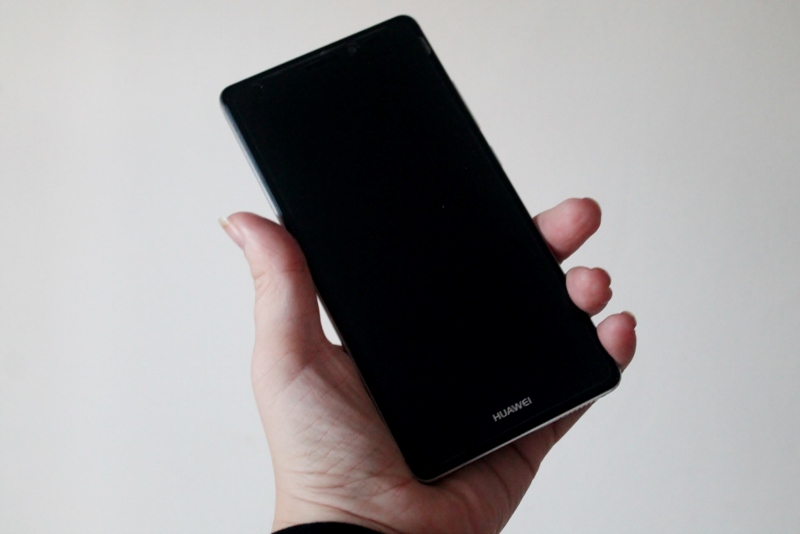
The Huawei Mate S is lovely and slimline, with a frame size a touch over 7mm wide. It looks beautiful too – with stylishly integrated antenna bands and a matted-shiny finish that has managed to avoid becoming scratched or dented so far; quite unusual in this house. With a (Gorilla Glass 4 covered) screen size equal to that of the iPhone 6 plus, at 5.5 inches, it could have ended up being just too chunky to fit comfortably in the palm of my hand. But Huawei have countered that with little in the way of bezels, and a curved rear that makes holding and using it surprisingly comfortable – something that is added to by the fact that it’s a lot lighter than other similarly sized phones too, at 155g. The volume and power buttons are on the right, and easily reachable – however you don’t always actually need to reach them because one of the innovative features included on the Huawei Mate S is a fingerprint scanner. Get ready to feel like some kind of all powerful, cunning spy!

The fingerprint scanner is very easy to set up (in fact, the whole phone is very easy to set up – it literally took me two minutes to port everything across from my old, battered android phone). It IS worth thinking about which finger you use though – I set it up using the index finger of my right hand before realising that actually, I tend to hold and manipulate the buttons on my phone with the left one. Force of right-handed habit! Luckily, the unlocking is the only thing that requires the correct finger – all the other things you can do using the scanning panel work with whichever finger you like…
You can use your fingerprint to quickly unlock, to take photos (great when it’s in selfie mode) and scroll through them in the gallery afterwards, to answer calls, or to stop that irritating IT’S 6.30 WAKE UP thing that phone alarms do (obviously I did ASK it to do the alarm thing, but I’m still never that happy about it when it happens). You can also pull down, manage and clear the notifications screen using it – something that I couldn’t get to work at first, until I went into settings and enabled it! All in all, the fingerprint scanner is an incredibly useful addition that generally works well, adding to the user-friendly design overall.
The screen is crisp and bright – I like vibrant, in your face colour, and the Huawei Mate S certainly delivers that. With 1080p HD and a high contrast ratio, everything is very vivid. Good news for washed-out-white-minimalist-instagrammers too though, there’s a colour temperature adjuster available so you can tone it all down a bit if you like your phone to be less in-your-face.
Organisation
The Huawei Mate S runs Android 5.1.1, taking the useful features of Lollipop and merging them with a bit of an iOS’y twist that I like a lot. This includes squarish icons with rounded corners, set out easily; and a handy drop down notifications list that is ordered by time.

The larger model also comes with Force Touch, which allows the display to detect how hard you are pressing, and tailors its response accordingly. This means that, somewhat unexpectedly, you can use the phone as a weighing scale. The 32GB model I’ve been using can’t do that, but given how often I lose my scales when whipping up a cake it’d be very handy to have a phone that can! (The Force Touch can also do stuff to photos, and replace the triangle, circle and square navigation buttons too but since neither of those are related to cake I’m not so worried about them… ). At the moment, Force Touch seems a bit on the limited side – but in the future, who knows – there’s definitely potential there.
Music
The headphones jack is at the top of the phone, something that I know some people don’t like but I definitely do, as it makes sense when the phone is in my pocket for the wire to run from the top rather than the bottom. It also doesn’t get in the way if I’m using my headphones whilst browsing.
The inbuilt speaker isn’t the greatest – sticking Muse into my Spotify account brought up some great tracks that were nice and bassy through my headphones but had a decidely tinny feel once I unplugged the wire; but the option to use the second sim slot as an expandable memory area for a micro SD card is a definite bonus. Plenty of options for storing music directly on your phone. And lots of potential for photos too…
Photography
With a 13MP rear facing camera, protected by sapphire glass to avoid scratches and damage, the Huawei Mate S boasts the capability to take some wonderful photos. Alongside that, it has a ‘Pro’ camera mode that allows users to fiddle around with the settings themselves, making use of the included Digital SLR level sensor; and it also includes a four colour sensor and LED flash with built in colour temperature adjustment. And don’t forget the optical image stabilisation either! All these things got me very excited to give the camera a thorough testing.
I take a LOT of photos, so a camera has to be really good to live up to my expectations of being able to get the odd non-blurry photo of the kids doing something hard-to-see in the dark winter nights.
There’s an 8MP front facing camera too, which includes a flash specially made for selfie-taking with a soft lighting feature – and if you like the pouty-mouthed alien-eyed look there’s even a beauty mode that can thin out your face and smooth the skin too. It works scarily like it says it will. Behold my beautiful alien transformation:
Both cameras allow 1080p video recording, and there’s a nifty time lapse mode that comes in pretty handy for the times I don’t have my GoPro hanging around.
Overall, I really like all the camera features. The shutter works incredibly quickly, the focus locks on pretty much instantly, and being able to use the fingerprint scanner as the ‘take photo NOW’ button is very useful too. I love the ‘lights’ mode, which gives the option to take pretty headlight trail pictures easily – I didn’t have a tripod on me when I tried it but it worked well even with a bit of wobbling on my behalf.
Final Verdict
With it’s excellent camera, easy to use menu and settings and the innovative fingerprint scanner, plus the beautiful crisp display, this phone stands out for me amongst others that I have tried recently. It’s very user friendly, and the dual-sim feature has got my smile going again after the recent disappointment I had with the Asus Zenfone 6. The battery life is reasonable, it charges quickly, and it’s the perfect size for easy one handed use (with three kids tugging on your arms).
Oh, and it makes phone calls easily too 😉


Leave a Reply